 AppMaka
Turn any website into a standalone desktop app.
Tired of 50 browser tabs swallowing your RAM and mixing up your accounts? AppMaka gives Gmail, YouTube, Notion, ChatGPT, and Discord their own private window, isolated storage, built-in EasyList ad blocking, and instant Alt+Space summoning.
-
EasyList Block
YouTube
EasyList blocking · Picture-in-Picture window
-
Whisper STT
ChatGPT / Claude
Dedicated AI assistant window · Instant STT dictation
-
Isolated Cookies
Discord Web
Independent session without Electron bloat
-
Partitioned Vault
Work Gmail vs Personal Gmail
Isolated credential partitions · Zero account leakage
YouTube Native Frame
Running in its own dedicated lightweight webview process. Re-opening focuses this exact window instead of spawning duplicate tabs.
Everything you need. Zero fluff.
AppMaka isn't just a site bookmark. It is a full desktop workflow suite crafted in Rust for speed and privacy.
True Multi-Account Partitions
Run three different Gmails, GitHub accounts, or Twitter handles side-by-side without opening incognito windows. Each web app gets its own sealed cookie jar and LocalStorage partition. No cookies ever leak across instances.
EasyList & EasyPrivacy
Integrated ad and tracker filtering at the network level. Requests are aborted before byte transfer begins.
Interactive RAM Saver Estimator
Drag the slider: what dozens of always-open tabs cost vs. AppMaka with its apps auto-suspended:
AppMaka's figure: the whole app measured idling with its apps suspended in testing. The per-tab cost is a typical estimate — your tabs will differ.
Local Whisper Speech-to-Text
Press your custom hotkey and speak. High-precision Whisper models transcribe your voice directly into whatever app you have focused. 100% on-device inference: zero audio leaves your machine, zero cloud latency.
Workspace Dock & Instant Search
Pin your everyday apps and accounts to a floating dock on any screen edge, and find anything in the launcher instantly — search is indexed, multi-word, and acronym-smart (try vsc). Alt+1–9 opens the top results without touching the mouse.
Windows Credential Manager Vault
Saved logins live exclusively in the Windows Credential Manager — never stored in unencrypted JSON or plain files. Auto-filling will strictly refuse to fire on mismatched domains.
Local Clipboard Buffer
Searchable history of text and images copied over your session. Never lose an URL, code snippet, or address you copied earlier.
One-Tap Morning Routines
Bind one hotkey to launch your entire workstack: Jira, Slack, GitHub, and Music arranged side-by-side or tabbed seamlessly.
As Built & Used Every Day
A peek at the actual AppMaka launcher in daily production running 16 isolated web apps and 81 native programs.
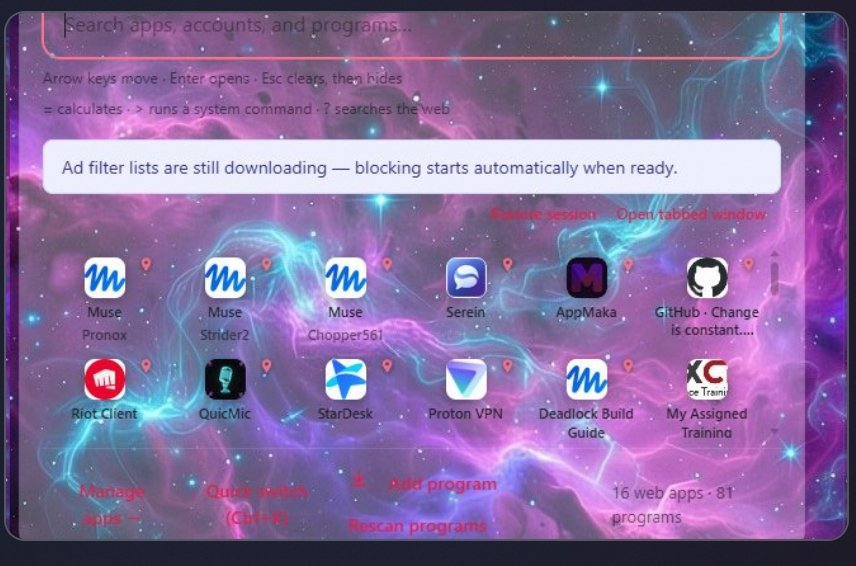
Fast fuzzy search, cosmic theme, custom cursor trails, and instant response.
Ready to declutter your desktop?
Free, source-available, and built to treat your computing environment with respect.
Download AppMaka v0.18.4 (Windows)